C++20: Concepts, an introduction

I am pretty new doing C++ Concepts, so I will post here the things I will learn while starting to use them.

C++ Concepts are one of these three large features that are shipped with C++20:

  • Concepts
  • Ranges
  • Modules

Basically, C++ Concepts define a set of conditions or constraints that a data type must fulfill in order to be used as a template argument.

For example, I would want to create a function that sums two values and prints the result. In C++17 and older I would code something like this:

template <typename A, typename B>
void sum_and_print(const A& a, const B& b)
{
    std::cout << (a + b) << "\n";
}

And it works properly for types A and B that DO have the operator+ available. If the types I am using do not have operator+, the compiler naïvely will try to substitute types A and B for the actual types and when trying to use the missing operator on them, it will fail miserably.

The way the compiler works is correct, but failing while doing the actual substitution with no earlier verification is kind of a reactive behavior instead of a proactive one. And in this way, the error messages because of substitution error occurrences are pretty large, hard to read and understand.

C++20 Concepts provide a mechanism to explicit the requirements that, in my example, types A and B would need to implement in order to be allowed to use the “sum_and_print” function template. So when available, the compiler will check that those requirements are fulfilled BEFORE starting the actual substitution.

So, let’s start with the obvious one: I will code a concept that mandates that all types that will honor it will have operator+ implemented. It is defined in this way:

template <typename T, typename U = T>
concept Sumable =
 requires(T a, U b)
 {
    { a + b };
    { b + a };
 };

The new keyword concept is used to define a C++ Concept. It is defined as a template because the concept will be evaluated against the type or types that are used as template arguments here (in my case, T and U).

I named my concept “Sumable” and after the “=” sign, the compiler expects a predicate that needs to be evaluated on compile time. For example, if I would want to create a concept to restrict the types to be only “int” or “double”, I could define it as:

template <typename T>
concept SumableOnlyForIntsAndDoubles = std::is_same<T, int>::value || std::is_same<T. double>::value;

The type trait “std::is_same<T, U>” can be used here to create the constraint.

Back to my first example, I need that operator+ will be implemented in types A and B, so I need to specify a set of requirements for that constraint. The new keyword “requires” is used for that purpose.

So, any definition between braces in the requires block (actually “requires” is always a block, even when only a requirement is specified) is something the types being evaluated must fulfill. In my case, “a+b” and “b+a” must be valid operations. If types T or U do not implement operator+, the requirements will not be fulfilled and thus, the compiler will stop before even trying to substitute A and B for actual types.

So, with such implementation, my function “sum_and_print” works like a charm for ints, doubles, floats and strings!

But, what if I have another type like this one:

struct N
{
    int value;

    N operator+(const N& n) const
    {
        return { value + n.value };
    }
};

Though it implements operator+, it does not implement operator<< needed to work with std::cout.

To add such constraint, I need to add an extra requirement to my concept. So, it could be like this one:

template <typename T, typename U = T>
concept Sumable =
 requires(T a, U b)
 {
    { a + b };
    { b + a };
 }
 && requires(std::ostream& os, const T& a)
 {
     { os << a };
 };

The operator && is used here to specify that those requirements need to be fulfilled: Having operator+ AND being able to do “os << a“.

If my types do not fulfill such requirements, I get an error like this in gcc:

<source>:16:5:   in requirements with 'std::ostream& os', 'const T& a' [with T = N]
<source>:18:11: note: the required expression '(os << a)' is invalid
   18 |      { os << a };
      |        ~~~^~~~

That, though looks complicated, is far easier to read than the messages that the compiler produces when type substitution errors occur.

So, if I want to have my code working properly, I need to add an operator<< overloaded for my type N, having finally something like this:

#include <iostream>

template <typename T, typename U = T>
concept Sumable =
 requires(T a, U b)
 {
    { a + b };
    { b + a };
 }
 && requires(std::ostream& os, const T& a)
 {
     { os << a };
 };

template <Sumable A, Sumable B>
void sum_and_print(const A& a, const B& b)
{
    std::cout << (a + b) << "\n";
}

struct N
{
    int value;

    N operator+(const N& n) const
    {
        return { value + n.value };
    }
};

std::ostream& operator<<(std::ostream& os, const N& n)
{
    os << n.value;
    return os;
}

int main()
{
    sum_and_print( N{6}, N{7});
}

Notice that in my “sum_and_print” function template I am writing “template <Sumable a, Sumable b>” instead of the former “template <typename A, typename B>“. This is the way I ask the compiler to validate such type arguments against the “Sumable” concept.


What if I would want to have several “greeters” implemented in several languages and a function “greet” that will use my greeter to say “hi”. Something like this:

template <Greeter G>
void greet(G greeter)
{
    greeter.say_hi();
}

As you can see, I want my greeters to have a method “say_hi“. Thus, the concept could be defined like this one in order to mandate the type G to have the method say_hi() implemented:

template <typename G>
concept Greeter = requires(G g)
{
    { g.say_hi() } -> std::convertible_to<void>;
};

With such concept in place, my implementation would be like this one:

template <typename G>
concept Greeter = requires(G g)
{
    { g.say_hi() } -> std::convertible_to<void>;
};

struct spanish_greeter
{
    void say_hi() { std::cout << "Hola amigos\n"; }
};

struct english_greeter
{
    void say_hi() { std::cout << "Hello my friends\n"; }
};


template <Greeter G>
void greet(G greeter)
{
    greeter.say_hi();
}


int main()
{
    greet(spanish_greeter{});
    greet(english_greeter{});
}

Why would I want to use concepts instead of, say, base classes? Because:

  1. While using concepts, you do not need to use base classes, inheritance, virtual and pure virtual methods and all that OO stuff only to fulfill a contract on probably unrelated stuff, you simply need to fulfill the requirements the concept defines and that’s it (Interface Segregation of SOLID principles would work nice here, anyway, where your concepts define the minimum needed possible constraints for your types).
  2. Concepts are a “Zero-cost abstraction” because their validation is performed completely at compile-time, and, if properly verified and accepted, the compiler does not generate any code related to this verification, contrary to the runtime overhead needed to run virtual things in an object-oriented approach. This means: Smaller binaries, smaller memory print and better performance!

I tested this stuff using gcc 10.2 and it works like a charm.
Deleaker, part 0: Intro

I am testing this nice desktop tool called “Softanics Deleaker” (https://www.deleaker.com/). It was written by Artem Razin and, as you can deduce by its name, it is an application that helps the programmers to find memory leaks on C++, Delphi and .NET applications.

Starting this post, I will post several blog entries about my experiences using it and the features it exposes.

I installed it and installed the Visual Studio extension that ships with the installer. For my tests, I am using Visual Studio 2019 16.4 preview.

In Visual Studio I created a C++ console application and wrote this very simple and correct application:

int main()
{
    std::cout << "Hello World!\n";
    return 0;
}

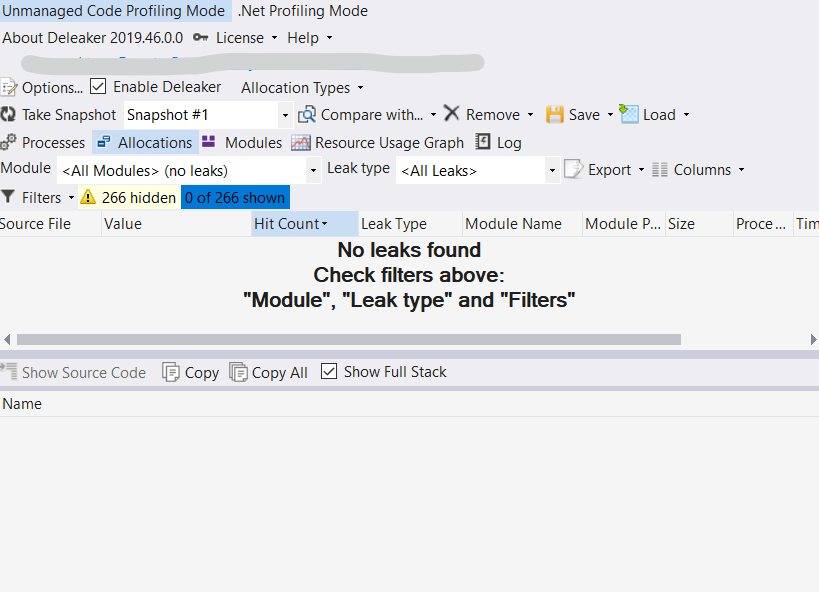
When I run the local debugger, and since I have installed the Deleaker VS extension, the leaker will load all libraries and symbols of my application and will open a window similar to this one:

I still do not know what all those options mean, but the important thing here is the “No leaks found” message. The filter containing the “266 hidden” items refers to known leaks that Deleaker knows that exist in the Microsoft C Runtime Library.

Now, I will create a very small program too containing a small memory leak:

int main()
{
    for (int i = 0; i < 10; i++)
    {
        char* s = new char{'a'};
        std::cout << *s << "\n";
    }

    return 0;
}

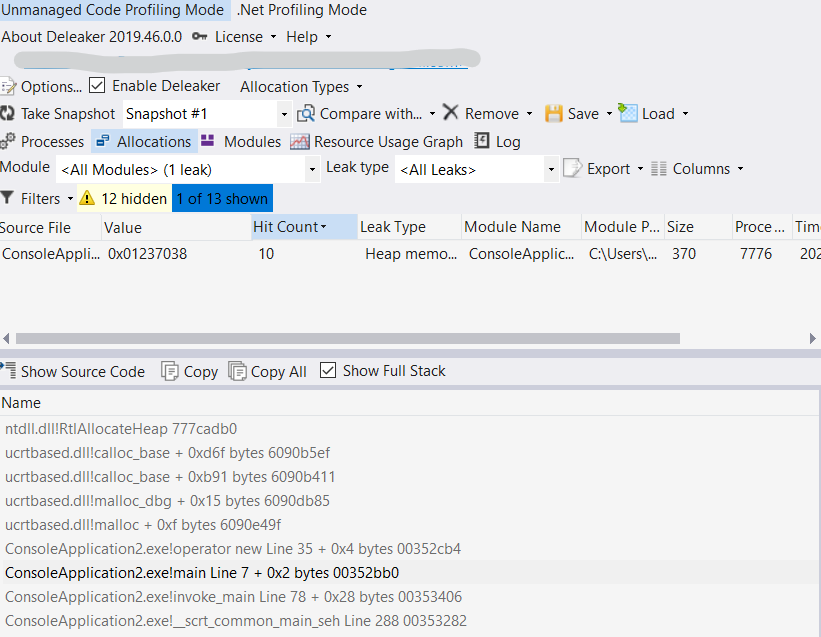
As obviously observed, I am allocating dynamically one byte to contain a character and I am forgetting to delete it. When I debug it, I get this interesting Deleaker window:

Now Deleaker detected my forgotten allocation and says that to me: “ConsoleApplication2.exe!main Line 7”.

As you can see, the “Hit Count” says that the allocation occurred 10 times (because my loop) and it says that 370 bytes leaked on this problem. Though that seems weird because I allocated only 1 byte 10 times, the 370 bytes appear because I compiled my code in Debug Mode and the compiler adds a lot of extra info per allocation. When I changed my compilation to Release Mode, I got the actual 10 bytes in the Size column.

When you click into the information table in the row containing the memory leak information, the Visual Studio editor highlights that line and moves the caret to such position (the new char{‘a’} line , so you realize where you allocated memory that was not released.

And that is it for now.

In next blog entries I will explore how to “Deleak” not so obvious things, how Deleaker behaves with shared pointers, COM objects, shared libraries, templates, virtual destructors and so on :)

Happy 2020!


C++ “Hello world”

Ok, the most famous first program in any programming language is the ‘Hello World’ program, so I will explain how to create one in this post.

For my example, I will use ‘g++’ in a Linux environment, but ‘clang++’ works exactly the same way.

To write a ‘Hello World’ program in C++, you will need to create an empty file and name it with an appropriate extension (any name will do, for instance, HelloWorld.cpp). Common C++ file extensions include ‘.cpp’, ‘.cxx’, and ‘.cc’.

The compiler does not require the filename to match the name of any ‘class’ or other content inside the file. You can also store the file in any folder; there is no need to create it in a specific directory containing all the elements of a ‘package’ (like in Java).

Once you have created an empty HelloWorld.cpp file, you can open it in any text editor and start writing the following lines of code:

#include <iostream>
 
int main()
{
  std::cout << "Hello world\n";
}

Save the file, open a terminal, navigate to the folder where your file is located, and then enter the following command:

g++ HelloWorld.cpp -o HelloWorld

If you do not receive any messages after entering the command, congratulations! Your program has compiled successfully. Otherwise, there is an error in your code that you will need to fix before compiling again.

Once it compiles correctly, you will need to run the program. In a Linux/Unix environment, you do this by typing ./ followed by the program’s name:

./HelloWorld

And the program output should be:

Hello world

Understanding how all of this works

The C++ compilation process consists of three main steps:

  • Preprocessing: This step involves the preprocessor, which performs various text substitutions and transformations on your code before it is compiled.
  • Compilation: During this phase, your code is converted into machine code, with placeholders for calls to functions that reside in external libraries.
  • Linking: This step resolves those function calls by linking them to the actual functions in the libraries your program uses. If you do not specify any additional libraries (as in our example), your program will only be linked to the Standard Library, which comes with any C++ compiler.

#include

#include <iostream>

All lines starting with ‘#’ are called ‘preprocessor directives’. These are instructions that the preprocessor recognizes and executes.

#include tells the preprocessor to locate the file specified either inside quotes or between angle brackets and insert its content where the #include directive is used.

If the filename is enclosed in angle brackets (as in our case), the preprocessor searches for the file in a predefined directory that the compiler is aware of. For example, it will look for the file iostream in that directory. In a Linux environment, these files are typically located in a path similar to this one (I am using g++ 8.2):

/usr/include/c++/8

If the filename is declared between double quotes, it means the file will be in the current folder or in a folder explicitly specified when compiling the program.

iostream is the file that contains a lot of code allowing our programs to handle input and output. In our ‘Hello World’, we will need std::cout, which is defined in this file.

main function

int main()

When you invoke your program, the operating system needs to know which piece of code to execute. This code resides in the main function.

All functions must return something. For example, if you call a function sum that adds two numbers, it must return a value containing the result of the sum. So, the sum function must return an integer value (an int). Some old compilers allowed the main() function to return void (meaning ‘return nothing’), but the C++ standard specifies that main() must return an int value.

However, even if main() is declared to return an int, if you do not explicitly return anything, the compiler will not complain and will automatically return 0. Note that this behavior is exceptional and only allowed for the main() function.

The return value of the main() function indicates whether an error occurred. A return value of 0 means the program executed without errors, while a non-zero value indicates an error. The specific non-zero value depends entirely on the programmer’s design and error-handling mechanisms.

The program will continue running as long as the main() function is executing. Once its execution ends, the program terminates and returns the value to the operating system.

The body of any function is enclosed in curly braces.

std::cout

std::cout << "Hello world\n";

std::cout is a pre-existing object that represents command line output. The << operator essentially sends the text "Hello world\n" to the std::cout object, resulting in that text being displayed in the terminal.

The \n character sequence indicates a newline.

g++

g++ and clang are the most popular C++ compilers for Unix platforms today. You can replace one with the other almost without restrictions because clang was designed to be a drop-in replacement for g++.

When you say something like:

g++ HelloWorld.cpp

You are instructing the g++ compiler to go through the entire compilation process for the file HelloWorld.cpp. ‘Go through the entire compilation process’ in this case means running the preprocessor on the file, compiling it, linking it, and producing an executable.

Since I did not specify the name of the executable file in the command line example above, the g++ command generates a file called a.out in the current folder.

To specify the name of the file to be generated, you must invoke g++ with the -o option followed by the name of the executable file you want to create.

“Brisa Mística” released

Hi:

I have just published my latest album called “Brisa Mística”. It is available through several streaming services such as Spotify, Apple Music, CD Baby, Amazon Music, Deezer, YouTube, etc.

In memoriam of my mom: She already knew this music and she liked “El mensaje del viento”; she would have been happy of this release.

Mamá

Hace una semana se fue a un mejor lugar, dejó de sufrir esa enfermedad que la estaba consumiendo de a poquito los últimos cuatro meses, dejó de desesperarse por ya no poder ser lo que fue, como fue.

Y sí, sé que está ahora en paz, pero ya no está aquí, ya no la escucharé reir, llorar, sufrir, reñirme o jugar; ya no la escucharé haciendo cariños a mi wawa ni volveré a comer la comidita que siempre hacía para mí, o “para las chicas”, ni volveremos a reunirnos a cenar con ella en familia en fechas importantes.

Sé también que aunque ya no está, sigue aquí recordada, querida.

Te extraño mangre…

Salomé Pantoja

C++17: std::variant

Let’s suppose I have a system that handles students, teachers and crew of a school.

To model that in an object oriented style, I would have a class hierarchy similar to this one:

class person
{
std::string name;

public:
template <typename String>
person(String&& name) : name { forward<String>(name) }
{
}

virtual ~person() { }
const string& get_name() const { return name; }
virtual void do_something() = 0;
};

class student : public person
{
public:
using person::person;

void do_homework()
{
cout << "Need access to Stack Overflow\n";
}

void do_something() override
{
cout << "I am doing something the students do\n";
}
};

class teacher : public person
{
public:
using person::person;

void teach()
{
cout << "This is the unique truth\n";
}

void do_something() override
{
cout << "I am doing something the teachers do\n";
}
};

class crew : public person
{
public:
using person::person;

void help_team()
{
cout << "I am helping teachers and students\n";
}

void do_something() override
{
cout << "I am doing something crew do\n";
}
};

And my collection would be defined like this:

map<size_t, person*> people;

where the size_t ID would be the key of the map.

Since I do not want to deal with raw pointers, this would be a better definition:

map<size_t, unique_ptr<person>> people;

Now, I will insert some elements to my collection:

people.insert(make_pair(14, make_unique<student>("Phil Collins")));
people.insert(make_pair(25, make_unique<teacher>("Peter Gabriel")));
people.insert(make_pair(32, make_unique<crew>("Justin Bieber")));

To get the name of person 14, I should do something like:

people.find(14)->second->get_name(); //being 100% sure that person with ID 14 exists

And to do something specific implemented in a derived class, I need to downcast:

static_cast<crew&>(*people.find(32)->second).help_team();

Since C++11, the language has been evolving to a more generic and more template metaprogramming-like paradigm and has been getting away from the classical OOP design where inheritance and polymorphism are amongst the most important tools.

So, how could I implement something similar to the thing shown above without inheritance and polymorphism?

Let me introduce std::variant ! :)

C++17 introduced variant, that is basically a template class where you specify the possible types of the values that the variant instance can store, so, for my example, I could define something like:

using person = std::variant<student, teacher, crew>;

In this line, I am defining an alias person that represents a variant value that can store a student, a teacher or a crew (think on variant to be something like a typesafe union).

So, my map would be defined in this way:

map<size_t, person> people;

And my classes student, teacher, and crew could be defined as follows:

class student
{
std::string name;
public:
template <typename String>
student(String&& name) : name { forward<String>(name) }
{
}

const string& get_name() const { return name; }

void do_homework()
{
cout << "Need access to Stack Overflow\n";
}

void do_something()
{
cout << "I am doing something the students do\n";
}
};

class teacher
{
std::string name;
public:
template <typename String>
teacher(String&& name) : name { forward<String>(name) }
{
}

const string& get_name() const { return name; }

void teach()
{
cout << "This is the unique truth\n";
}

void do_something()
{
cout << "I am doing something the teachers do\n";
}
};

class crew
{
std::string name;

public:
template <typename String>
crew(String&& name) : name { forward<String>(name) }
{
}

const string& get_name() const { return name; }

void help_team()
{
cout << "I am helping teachers and students\n";
}

void do_something()
{
cout << "I am doing something crew do\n";
}
};

To make my example clean and to demonstrate that I do not need inheritance and polymorphism, notice I am not defining a base class nor I am defining virtual methods at all. Anyway. in real production code the coder could create a base class with no virtual methods and inherit from such class to avoid code duplication.

Notice also I am not using any pointer (raw or smart), so the map will contain actual values, removing one level of indirection and letting the compiler optimize based on that knowledge.

So, let me add some objects to the map:

people.insert(make_pair(14, student { "Phil Collins" }));
people.insert(make_pair(25, teacher { "Peter Gabriel" }));
people.insert(make_pair(32, crew { "Justin Bieber" }));

To get the person with id 14:

auto& the_variant = people.find(14)->second;

To get the “student” inside that variant object, I need to use the function get:

auto& the_student = get(the_variant);
cout << the_student.get_name() <<  "\n";

If I try to get an object that is not of the type stored in the variant, the system will throw a std::bad_variant_access exception, for example if I try to do this with the variant from the example above:

auto& the_student = get<teacher>(the_variant);

To execute a specific method of a given class, I do not need to do any downcasting because I already have the object of the given type, so, instead of:

static_cast<crew&>(*people.find(32)->second).help_team();

I would do:

get<crew>(people.find(32)->second).help_team();

that is by far straight and cleaner.

Now, given I have a method called “do_something” in all my classes, I would want to be able to invoke it no matter the type of the object stored in the variant.

So, I need to do something like this in the polymorphic world:

for (auto& p : people)
{
p.second->do_something();
}

To do this, there is a function called: std::visit.

What visit does is accessing the variant object and invoke the method passed as argument with the object stored in the variant. So, given my example, I could do something like:

auto& the_variant = people.find(14)->second;
visit([](auto& s)
{
s.do_something();
}, the_variant);

The magic is in the “auto” part here. When you “visit” a variant, the compiler generates one method for each type specified in the variant declaration, in my case 3 (one for student, one for crew and one for teacher), and executes the specific method depending on the type of the value stored in the variant. So, to execute do_something() for all objects in the variant, I need to do something like:

for (auto& p : people)
{
visit([](auto& s)
{
s.do_something();
}, p.second);
}

It is beautiful, isn’t it? Polymorphic-like behavior with no overhead that polymorphism brings.

C++: “auto” return type deduction

Before C++14, when implementing a function template, programmers did not know the return type of their functions and had to do something like this:

template <typename A, typename B>
auto do_something(const A& a, const B& b) -> decltype(a.do_something(b))
{
  return a.do_something(b);
}

Programmers had to use decltype to tell the compiler: “The return type of this method is the return type of the do_something method of object a.” The auto keyword was used to inform the compiler: “The return type of this function is declared at the end.”

Since C++14, coders can do something much simpler:

template <typename A, typename B>
auto do_something(const A& a, const B& b)
{
  return a.do_something(b);
}

Starting with C++14, the compiler deduces the return type of functions that use auto as the return type.

Restrictions:

All returned values must be of the same type. The example below will not even compile because it can return either an int or a double:

auto f(int n)
{
	if (n == 1)
    {
		return 1;
    }

	return 2.0;
}

For recursive functions, the first return value must allow the compiler to deduce the return type of the function, as in this example:

auto accumulator(int n)
{
	if (n == 0)
    {
		return 0;
    }

	return n + accumulator(n - 1);
}

Starting with C++20, a function can be declared like this and it will work properly:

auto do_something(const auto& a, const auto& b)
{
    return a.do_something(b);
}

When programmers define functions this way, if one or more function parameters are declared as auto, the entire function is treated as a template. So, while this new construction might seem to add more “functionality” to the auto keyword, it is really just a more convenient way of declaring function templates.

More posts about auto:

Music: “Stigmata” published

Hello,

I have just published my second album: “Stigmata“. It is already available through several streaming services such as Spotify, iTunes, Amazon, YouTube, etc.

Some info:

Hardware used:

  • MacBook Pro 13″ mid-2012
  • Yamaha PSR-213e
  • Casio CDP-220R
  • Audio Technica ATH-M50x

Software used:

Cover artwork:

  • Zdenka Kristel Johnson-Kirigin Orías

Dedicated to:

  • Zdenka, my beautiful wife; Ariana, my little daughter; and Salomé, my mother.

In memoriam:

  • Stephen Johnson (1927-2017), a wise owl. I am pretty sure he would have liked this work.

Music: Introducing “poiesis” again and again

Though I composed this work on 1997; I am publishing it again with a lot of improvements and some changes:

  • Modernized the sound a little bit.
  • Removed a lot of noises and effects.
  • Replaced several sampled instruments by AudioUnits.
  • Started to use Renoise instead of OpenMPT and Impulse Tracker.
  • Equalized, mixed and remastered again and again.

This is the hardware I used to “implement” this work:

  • MacBook Pro (mid 2010, mid 2012 for “update 1”) and MacMini (mid 2011).
  • Yamaha PSR-18.
  • Yamaha PSR-213e.

This is the software I used:

  • Impulse Tracker (the original version was implemented on this amazing piece of work).
  • OpenMPT.
  • Renoise 3.1.
  • nlogPoly Synth.
  • Korg M1e software emulator.
  • Imperfect Samples’ Steinway Walnut Concert Grand.
  • Native Instruments Kontakt 5.
  • Audacity.

The artwork was created by my wife: Zdenka Johnson-Kirigin Orías.

The C++17 code shown in the first cover is compilable code (if you define everything used before).

This is the song list:

  1. La nada
  2. Theogenesis
  3. Emerger del caos
  4. El espíritu de la verdad
  5. El diseño
  6. Fiat lux
  7. Big-bang
  8. (update 1) Big-bang 12″
  9. El primer segundo
  10. El mal
  11. Expansión
  12. Brillo estelar
  13. Agujero negro
  14. El libro de la vida
  15. Hogar
  16. Sosiego

Update (20161231): I published a remastered version of this album containing a 12″ version of “Big-bang”. The Spotify player URI in this entry was also modified to refer to “Poiesis Update 1”  :)

C++: Smart pointers, part 5: weak_ptr

This is the last of several posts I wrote related to smart pointers:

  1. Smart pointers
  2. unique_ptr
  3. More on unique_ptr
  4. shared_ptr
  5. weak_ptr

In modern C++ applications (C++11 and later), you can replace almost all your naked pointers to shared_ptr and unique_ptr in order to have automatic resource administration in a deterministic way so you will not need (almost, again) to release the memory manually.

The “almost” means that there is one scenario where the smart pointers, specifically, the shared_ptr instances, will not work: When you have circular references. In this scenario, since every shared_ptr is pointing to the other one, the memory will never be released.

Continue reading “C++: Smart pointers, part 5: weak_ptr”

C++: Perfect forwarding

The following function template invoke (as its name says) invokes the function/functor/lambda expression passed as an argument, passing it the two extra arguments given:

#include <iostream>
#include <string>
  
void sum(int a, int b)
{
    std::cout << a + b << std::endl;
}
 
void concat(const std::string& a, const std::string& b)
{
    std::cout << a + b << std::endl;
}
 
template <typename PROC, typename A, typename B>
void invoke(PROC p, const A& a, const B& b)
{
    p(a, b);
}
 
int main()
{
    invoke(sum, 10, 20);
    invoke(concat, "Hello ", "world");
    return 0;
}

Nice, it works as expected, and the result is:

30
Hello world

The problem with that implementation is that it only works with arguments passed as constant references, so if the programmers try to invoke the following function:

void successor(int a, int& b)
{
    b = a + 1;
}

with this call:

int s = 0;
invoke(successor, 10, s);
std::cout << s << std::endl;

the compiler returns this error in the invoke implementation:

Binding of reference to type 'int' to a value of type 'const int' drops qualifiers

This error occurs because the second argument of the successor function is not a const-reference.

Before C++11, the only way to deal with this problem was creating a set of overloads containing all the possible combinations of const, non-const references in the methods, something like this:

#include <iostream>
#include <string>
 
void sum(int a, int b)
{
    std::cout << a + b << std::endl;
}
 
void concat(const std::string& a, const std::string& b)
{
    std::cout << a + b << std::endl;
}
 
void successor(int a, int& b)
{
    b = ++a;
}
 
template <typename PROC, typename A, typename B>
void invoke(PROC p, const A& a, const B& b)
{
    p(a, b);
}
 
template <typename PROC, typename A, typename B>
void invoke(PROC p, const A& a, B& b)
{
    p(a, b);
}
 
template <typename PROC, typename A, typename B>
void invoke(PROC p, A& a, const B& b)
{
    p(a, b);
}
 
template <typename PROC, typename A, typename B>
void invoke(PROC p, A& a, B& b)
{
    p(a, b);
}
 
int main()
{
    invoke(sum, 10, 20);
    invoke(concat, "Hello", "world");
    int s = 0;
    invoke(successor, 10, s);
    std::cout << s << std::endl;
    return 0;
}

Notice that there are four overloads for the invoke function template example above because two parameters need to be forwarded to the function passed in P.

If the function had more parameters, this would be unmaintainable (for N arguments, programmers would need to have 2^N overloads because of all the const/non-const possible combinations).

Starting from C++11, C++ lets programmers perform perfect forwarding, which means that they can forward the parameters passed to a function template to another function call inside it without losing their own qualifiers (const-ref, ref, value, rvalue, etc.).

To use this technique, the invoke function template in the example must have arguments passed as rvalue references, and the std::forward function template, which is in charge of performing the type deduction and forwarding the arguments to the invoked function with its own reference, const-reference, or rvalue-reference qualifiers, must be used. Using this technique, the code becomes something like this:

#include <iostream>
#include <string>
#include <utility>
 
void sum(int a, int b)
{
    std::cout << a + b << std::endl;
}
 
void concat(const std::string& a, const std::string& b)
{
    std::cout << a + b << std::endl;
}
 
void successor(int a, int& b)
{
    b = ++a;
}
 
template <typename PROC, typename A, typename B>
void invoke(PROC p, A&& a, B&& b)
{
    p(std::forward<A>(a), std::forward<B>(b));
}
 
int main()
{
    invoke(sum, 10, 20);
    invoke(concat, "Hello", "world");
    int s = 0;
    invoke(successor, 10, s);
    std::cout << s << std::endl;
    return 0;
}

What is this technique used for?

For example, consider this class:

struct A { };
struct B { int a; int b; };
struct C { int a; int b; string c; };
struct D
{
public:
    D(int a) {}
};

Programmers want to have a factory function template that will let them run this code:

int main()
{
    auto a = factory<A>();
    auto b = factory<B>(10, 20);
    auto c = factory<C>(30, 40, "Hello");
    auto d = factory<D>(10);
     
    std::cout << c->c << std::endl;
}

As can be seen, the factory function template must be a variadic-template-based function, so a solution would be this one:

template <typename T, typename ... ARGS>
std::unique_ptr<T> factory(const ARGS&... args)
{
    return std::unique_ptr<T>{new T { args... }};
}

Notice that the std::make_unique<T> helper template method works like this example and serves the same purpose: create a new std::unique_ptr of type T, forwarding the parameters passed to its constructor.

Nice, and it works as expected. But the problem of losing qualifiers arises again. What happens with the following code?


If programmers try to use this struct in this way:

int main()
{
    int x = 2;
    auto e = factory<E>(x);
    std::cout << x << std::endl;  
}

They will get an error because x is an int&, not a const int&.

Fortunately, perfect forwarding is the way to go:

#include <iostream>
#include <string>
#include <utility>
 
struct A { };
struct B { int a; int b; };
struct C { int a; int b; string c; };
struct D
{
public:
    D(int a) {}
};
 
struct E
{
    int& e;
    E(int& e) : e{e} { e++; }
};
 
template <typename T, typename ... ARGS>
std::unique_ptr<T> factory(ARGS&&... args)
{
    return std::unique_ptr<T>{new T { std::forward<ARGS>(args)... }};
}
 
int main()
{
    auto a = factory<A>();
    auto b = factory<B>(10, 20);
    auto c = factory<C>(30, 40, "Hello");
    auto d = factory<D>(10);
     
    int x = 2;
    auto e = factory<E>(x);
    std::cout << x << std::endl;
}

Perfect forwarding also helps avoid writing several overloads of functions to support move semantics and copy semantics.

For example:

#include <iostream>
 
struct X
{
    X() { std::cout << "ctor" << std::endl; }
    X(const X&) { std::cout << "copy ctor" << std::endl; }
    X(X&&) { std::cout << "move ctor" << std::endl; }
};
 
struct Wrapper
{
    X w;
     
    Wrapper(const X& w) : w{w} { }
};
 
int main()
{
    Wrapper w1{X {}};
    std::cout << "***" << std::endl;
    X y;
    Wrapper w2{y};
}

This produces the output:

ctor
copy ctor
***
ctor
copy ctor

The little problem here is that when w1 is being constructed, the instance of X is a temporary instance that will be destroyed immediately after invoking the Wrapper constructor. In this case, invoking the move constructor should be better (performance-wise).

So, the programmers can create a second constructor and modify the Wrapper class to be like this:

struct Wrapper
{
    X w;
     
    Wrapper(const X& w) : w{w} { }   
    Wrapper(X&& w): w{std::move(w)} { } // Adding a overloaded constructor
};

Cool! It works as expected:

ctor
move ctor
***
ctor
copy ctor

When constructing w1, the Wrapper constructor with an rvalue reference parameter is used. In the example with a constructor that takes one parameter, this works nicely and is easy to maintain, but with constructors or functions that take many parameters, the same maintainability issues mentioned above arise again. So, programmers can rely on perfect forwarding to let the compiler decide which constructor to use and generate the required (and desired) code:

struct Wrapper
{
    X w;
     
    template <typename Q>
    Wrapper(Q&& w) : w{std::forward<Q>(w)} { }
};

Nice, isn’t it?

std::forward<T> is declared in the header file <utility>

C++: Smart pointers, part 4: shared_ptr

This is the fourth post of several posts I wrote related to smart pointers:

  1. Smart pointers
  2. unique_ptr
  3. More on unique_ptr
  4. shared_ptr
  5. weak_ptr

As I mentioned in other posts, C++11 brings a new set of smart pointers into C++. The most useful smart pointer is shared_ptr: Its memory management policy consists in counting the number of shared_ptr instances that refer to the same object in the heap.

Continue reading “C++: Smart pointers, part 4: shared_ptr”

C++: Smart pointers, part 3: More on unique_ptr

This is the third post of several posts I wrote related to smart pointers:

  1. Smart pointers
  2. unique_ptr
  3. More on unique_ptr
  4. shared_ptr
  5. weak_ptr

Ok, here I am going to write about two other features that unique_ptr has that I did not mention in my last post.

unique_ptr default behavior consists on take ownership of a pointer created with new and that would normally be released with delete.

Continue reading “C++: Smart pointers, part 3: More on unique_ptr”

C++11: std::future and std::async

C++11 introduces support for asynchronous calls in a very easy way.

An asynchronous call is a method invocation that will be executed in a separate thread (or core or processor); so, the caller of the method does not wait for the result of the execution and continue doing what is next; in this way, the compiler/processor/operating system can optimise the execution of the program and execute several routines at the same time (given the now common multicore systems we all have at home and in our pockets!). The standard library provides the mechanisms to perform those asynchronous calls and store the results until the caller will actually need them.

Continue reading “C++11: std::future and std::async”

C++11: std::thread

The standard library that ships with the new C++11 contains a set of classes to use threads. Before this, we needed to use the OS specific thread facilities each OS provides making our programs hard to port to other platforms.

Anyway, as today (November 16th, 2012), I tried threads using g++ 4.7 in Linux, Windows (through mingw), Mac and NetBSD and I just had success in Linux, Windows and Mac do not implement the thread features and NetBSD misses some details on the implementation (the this_thread::sleep_for() method, for example). Microsoft Visual Studio 2012 ships with good thread support.

To define a thread, we need to use the template class std::thread and we need to pass it a function pointer, a lambda expression or a functor. Look at this example:

Continue reading “C++11: std::thread”